<?xml version="1.0" encoding="utf-8"?><feed xmlns="http://www.w3.org/2005/Atom" ><generator uri="https://jekyllrb.com/" version="3.10.0">Jekyll</generator><link href="https://numerlab.org/feed.xml" rel="self" type="application/atom+xml" /><link href="https://numerlab.org/" rel="alternate" type="text/html" /><updated>2026-07-22T11:49:03+00:00</updated><id>https://numerlab.org/feed.xml</id><title type="html">Numerator’s Blog</title><subtitle>Blog about cloud, containers, networking, and bash tools.</subtitle><entry xml:lang="en"><title type="html">Im canceling my claude subscription</title><link href="https://numerlab.org/2026/07/22/im-canceling-claude-subscription/" rel="alternate" type="text/html" title="Im canceling my claude subscription" /><published>2026-07-22T00:00:00+00:00</published><updated>2026-07-22T00:00:00+00:00</updated><id>https://numerlab.org/2026/07/22/im-canceling-claude-subscription</id><content type="html" xml:base="https://numerlab.org/2026/07/22/im-canceling-claude-subscription/"><![CDATA[<p>Once upon a time i was out of tokens. again. so i launched opencode to keep working. but this time i picked DeepSeek V4 Flash free, and i wasnt ready for what happened.</p>

<p>deepseek finished the work faster. for my workflow — figure out how something should work, give the bot a list of instructions how the software should work and how to create it — deepseek gave better results, faster. claude sonnet could finish too, but it used more tokens and the result was usually more buggy.</p>

<p>and i can hear you screaming in the comments — why sonnet and not opus or even fable? the reason is simple, token budget. but my point stands: the smaller model, at least from my day to day work, outperforms the bigger one. but only when im providing the instructions, i think. this is just how i work — i have a vision how software should work and i want my agent to execute it.</p>

<hr />

<p>lets get technical</p>

<table>
  <thead>
    <tr>
      <th>model</th>
      <th>parameter count</th>
      <th>ram usage</th>
    </tr>
  </thead>
  <tbody>
    <tr>
      <td>Sonnet 5</td>
      <td>1T-2T (rumors+leaks)</td>
      <td>640gb-1.2Tb</td>
    </tr>
    <tr>
      <td>DeepSeek V4 Flash</td>
      <td>284B (open source weights)</td>
      <td>85gb-570gb (depends on quantization)</td>
    </tr>
  </tbody>
</table>

<p>and the main deal for me is that this model can run locally on consumer hardware.
im not saying you should cancel your claude sub. this works especially for my workflow.</p>

<hr />

<h2 id="real-world-tests">Real world tests</h2>

<p>so lets rewrite my old software — twitch viewer alert. it works like this: it watches the viewer count, and when the number changes, it fires a notification. theres some settings too, but i dont remember much more. the task for the agents is to convert this into a chrome extension. originally it was just a script you paste into the browser console — dont judge me, i was 19 when i wrote it.</p>

<p>each model was tested once in autonomous mode. the metrics are: token usage, time, and how many times i had to step in to keep things moving.</p>

<h3 id="prompt">Prompt</h3>

<p>hi i have this older project https://github.com/wallach-game/twitch-viewer-alerter and i wanna convert it into chrome addon, btw do not push to this repo, keep it as local cloned repo</p>

<h3 id="deepseek-v4-flash">DeepSeek V4 Flash</h3>

<p>time: 4 minutes<br />
tokens: 46,796<br />
cost: $0.000004<br />
interventions: 0<br />
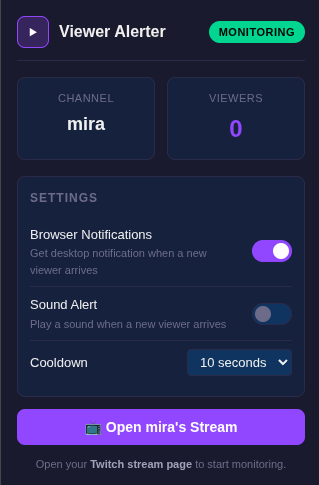
notes: added 7 new features and an icon</p>

<p>features added:</p>
<ul>
  <li>viewer count tracking: every 5s → every 3s</li>
  <li>alert box: replaced with browser notifications</li>
  <li>notifications with buttons (open stream / mute for 30m)</li>
  <li>on/off switches in popup</li>
  <li>sound alert</li>
  <li>cooldown (10s, configurable)</li>
  <li>spa navigation support via mutationobserver</li>
  <li>offline stream detection</li>
  <li>viewer count badge on toolbar</li>
  <li>robust selectors with 3 strategies and fallbacks</li>
  <li>purple play triangle icon</li>
</ul>

<p>ui: <br /> <img src="/img/cancelingclaudesub/deepseekui.png" alt="alt text" /> <br />
notification working: <br /> <img src="/img/cancelingclaudesub/deepseeknitsw.png" alt="alt text" /></p>

<h3 id="sonnet-5">Sonnet 5</h3>

<p>time: 2 minutes<br />
tokens: ~562,910 (mostly cache)<br />
cost: $0.40<br />
interventions: 0<br />
notes: the ui has less stuff than the original extension</p>

<p>verdict: imo it just yanked the old code and removed unnecessary stuff. but it figured out that browser notifications are not possible anymore — good catch.</p>

<p>ui: <br /><img src="/img/cancelingclaudesub/sonnetui.png" alt="alt text" /><br />
notification: <br /> <img src="/img/cancelingclaudesub/sonnetnotification.png" alt="alt text" /></p>

<h3 id="opus-48">Opus 4.8</h3>

<p>time: 1:37<br />
tokens: ~148,500<br />
cost: $0.30<br />
interventions: 0<br />
notes: this version doesnt have a settings ui. kinda odd. and the notification doesnt even work — it created some localstorage nonsense and literally told me at the end it might not work. also, it never figured out that browser notifications dont work without https in chrome extensions.</p>

<hr />

<h2 id="verdict">Verdict</h2>

<p>so heres the thing. deepseek did it in 4 minutes, added 11 new features, and cost basically nothing. sonnet did it faster (2 minutes) but the output was worse — stripped features, yanked old code. opus was the fastest at 1:37 but the result literally didnt work.</p>

<p>the numbers speak for themselves. deepseek v4 flash cost $0.000004, sonnet cost $0.40, opus cost $0.30. for my workflow — give clear instructions and let the model execute — the cheap model wins.</p>

<p>but in the end sonnet did what the prompt said — convert into an extension. and it did it. next time ill try a better prompt, something like “copy the original behavior first, then add new features and polish”.</p>

<p>am i saying you should cancel your sub? no. this is what works for me. but if you work like i do — plan first, then let the ai build it — give deepseek v4 flash a shot. you might be surprised.</p>

<p>and also deepseek screwed me over a few times, especially paired with opencodes auto exec command. its idea of fixing a running server app was deleting it without backup. but honestly, this can be blamed on my prompting.</p>

<h2 id="final-words">Final words</h2>

<p>im aware deepseek pricing is probably not sustainable at this level, but imo the same can be said about claude subscription. but i dont wanna get political here. the fact is that deepseek outperformed claude with a model that can be run locally on consumer hardware. thats the part that matters.</p>]]></content><author><name>Numerator</name></author><summary type="html"><![CDATA[Once upon a time i was out of tokens. again. so i launched opencode to keep working. but this time i picked DeepSeek V4 Flash free, and i wasnt ready for what happened.]]></summary></entry><entry xml:lang="en"><title type="html">bashumerate — A programmable iterator for your shell</title><link href="https://numerlab.org/2026/07/20/bashumerate-enumerator/" rel="alternate" type="text/html" title="bashumerate — A programmable iterator for your shell" /><published>2026-07-20T00:00:00+00:00</published><updated>2026-07-20T00:00:00+00:00</updated><id>https://numerlab.org/2026/07/20/bashumerate-enumerator</id><content type="html" xml:base="https://numerlab.org/2026/07/20/bashumerate-enumerator/"><![CDATA[<p>Ever found yourself writing this?</p>

<div class="language-bash highlighter-rouge"><div class="highlight"><pre class="highlight"><code><span class="k">for </span>f <span class="k">in</span> <span class="k">*</span>.txt<span class="p">;</span> <span class="k">do
  </span><span class="nb">wc</span> <span class="nt">-l</span> <span class="s2">"</span><span class="nv">$f</span><span class="s2">"</span>
<span class="k">done</span>
</code></pre></div></div>

<p>Or this?</p>

<div class="language-bash highlighter-rouge"><div class="highlight"><pre class="highlight"><code>find <span class="nb">.</span> <span class="nt">-name</span> <span class="s1">'*.sh'</span> <span class="nt">-exec</span> <span class="nb">wc</span> <span class="nt">-l</span> <span class="o">{}</span> +
</code></pre></div></div>

<p>Or maybe you pipe into <code class="language-plaintext highlighter-rouge">xargs</code> and pray your filenames don’t have spaces:</p>

<div class="language-bash highlighter-rouge"><div class="highlight"><pre class="highlight"><code>find <span class="nb">.</span> <span class="nt">-name</span> <span class="s1">'*.log'</span> | xargs <span class="nb">rm</span>
</code></pre></div></div>

<p>These all work, but each has its own syntax, its own flags, its own quirks. I wanted something simpler — one consistent way to iterate over anything.</p>

<h2 id="enter-bashumerate">Enter bashumerate</h2>

<div class="language-bash highlighter-rouge"><div class="highlight"><pre class="highlight"><code>enumerate <span class="nt">-f</span> <span class="s1">'*.sh'</span> <span class="nt">--</span> <span class="s1">'wc -l {}'</span>
</code></pre></div></div>

<p>That’s it. <code class="language-plaintext highlighter-rouge">-f</code> for files, <code class="language-plaintext highlighter-rouge">{}</code> is the placeholder for each item, <code class="language-plaintext highlighter-rouge">--</code> separates source from command.</p>

<p>It supports four source types:</p>

<table>
  <thead>
    <tr>
      <th>Flag</th>
      <th>Source</th>
      <th>Example</th>
    </tr>
  </thead>
  <tbody>
    <tr>
      <td><code class="language-plaintext highlighter-rouge">-f</code></td>
      <td>Files</td>
      <td><code class="language-plaintext highlighter-rouge">enumerate -f '*.sh' -- wc -l {}</code></td>
    </tr>
    <tr>
      <td><code class="language-plaintext highlighter-rouge">-l</code></td>
      <td>Lines</td>
      <td><code class="language-plaintext highlighter-rouge">enumerate -l /etc/hosts -- 'echo {}'</code></td>
    </tr>
    <tr>
      <td><code class="language-plaintext highlighter-rouge">-r</code></td>
      <td>Range</td>
      <td><code class="language-plaintext highlighter-rouge">enumerate -r 1 10 -- 'printf "n=%d\n" {}'</code></td>
    </tr>
    <tr>
      <td><code class="language-plaintext highlighter-rouge">-L</code></td>
      <td>List</td>
      <td><code class="language-plaintext highlighter-rouge">enumerate -L a b c -- 'echo item: {}'</code></td>
    </tr>
  </tbody>
</table>

<p>If you omit the command, items are printed to stdout — pipe them anywhere:</p>

<div class="language-bash highlighter-rouge"><div class="highlight"><pre class="highlight"><code>enumerate <span class="nt">-f</span> <span class="s1">'*.log'</span> | xargs <span class="nb">rm
cat </span>urls.txt | enumerate <span class="nt">-l</span> - | <span class="k">while </span><span class="nb">read </span>url<span class="p">;</span> <span class="k">do </span>curl <span class="nt">-s</span> <span class="s2">"</span><span class="nv">$url</span><span class="s2">"</span><span class="p">;</span> <span class="k">done</span>
</code></pre></div></div>

<h2 id="why-not-just-use-a-for-loop">Why not just use a for loop?</h2>

<p>You can. But <code class="language-plaintext highlighter-rouge">enumerate</code> gives you:</p>

<ul>
  <li><strong>Consistent syntax</strong> — same <code class="language-plaintext highlighter-rouge">{}</code> placeholder for files, lines, ranges, or lists</li>
  <li><strong>Template mode</strong> — single-quoted commands work as shell templates: <code class="language-plaintext highlighter-rouge">enumerate -f '*' -- 'cat {} | head -5'</code></li>
  <li><strong>Filters</strong> — <code class="language-plaintext highlighter-rouge">--include</code> and <code class="language-plaintext highlighter-rouge">--exclude</code> with glob patterns</li>
  <li><strong>NUL-safe</strong> — <code class="language-plaintext highlighter-rouge">-0</code> flag for NUL-delimited output</li>
  <li><strong>Extensible</strong> — drop a file in <code class="language-plaintext highlighter-rouge">lib/enumerators/</code> to add custom sources</li>
</ul>

<h2 id="adding-your-own-source">Adding your own source</h2>

<p>Create <code class="language-plaintext highlighter-rouge">lib/enumerators/docker.sh</code>:</p>

<div class="language-bash highlighter-rouge"><div class="highlight"><pre class="highlight"><code>enumerate_source_docker<span class="o">()</span> <span class="o">{</span>
  docker ps <span class="nt">--format</span> <span class="s1">''</span> | <span class="k">while </span><span class="nb">read</span> <span class="nt">-r</span> name<span class="p">;</span> <span class="k">do
    </span><span class="nb">printf</span> <span class="s1">'%s\0'</span> <span class="s2">"</span><span class="nv">$name</span><span class="s2">"</span>
  <span class="k">done</span>
<span class="o">}</span>
</code></pre></div></div>

<p>Now you can do:</p>

<div class="language-bash highlighter-rouge"><div class="highlight"><pre class="highlight"><code>enumerate docker <span class="nt">--</span> <span class="s1">'docker restart {}'</span>
</code></pre></div></div>

<p>That’s it. No registration, no config — just name the function <code class="language-plaintext highlighter-rouge">enumerate_source_&lt;name&gt;</code> and it’s available.</p>

<h2 id="under-the-hood">Under the hood</h2>

<p>The core is about 140 lines of bash. Sources are NUL-delimited internally (safe for spaces and special chars), and the <code class="language-plaintext highlighter-rouge">{}</code> placeholder is replaced at the shell level — no sed, no eval tricks.</p>

<div class="language-bash highlighter-rouge"><div class="highlight"><pre class="highlight"><code>enumerate <span class="nt">-f</span> <span class="s1">'*.md'</span> <span class="nt">--</span> <span class="s1">'wc -l {}'</span>
<span class="c"># → wc -l README.md</span>
<span class="c"># → wc -l docs/guide.md</span>
</code></pre></div></div>

<h2 id="install">Install</h2>

<div class="language-bash highlighter-rouge"><div class="highlight"><pre class="highlight"><code>basher <span class="nb">install </span>wallach-game/bashumerate

<span class="c"># or just clone and symlink</span>
git clone https://github.com/wallach-game/bashumerate.git
<span class="nb">ln</span> <span class="nt">-s</span> <span class="s2">"</span><span class="nv">$PWD</span><span class="s2">/bashumerate/bin/enumerate"</span> ~/.local/bin/
</code></pre></div></div>

<h2 id="the-name">The name</h2>

<p>“bash” + “enumerate” — a bash enumerator. Not creative, but it does what it says.</p>

<p>Check it out: <a href="https://github.com/wallach-game/bashumerate">github.com/wallach-game/bashumerate</a></p>]]></content><author><name>Numerator</name></author><summary type="html"><![CDATA[Ever found yourself writing this?]]></summary></entry><entry xml:lang="en"><title type="html">Containers in Azure and Internal Networking</title><link href="https://numerlab.org/2025/01/16/containers-in-azure-and-internal-networking/" rel="alternate" type="text/html" title="Containers in Azure and Internal Networking" /><published>2025-01-16T00:00:00+00:00</published><updated>2025-01-16T00:00:00+00:00</updated><id>https://numerlab.org/2025/01/16/containers-in-azure-and-internal-networking</id><content type="html" xml:base="https://numerlab.org/2025/01/16/containers-in-azure-and-internal-networking/"><![CDATA[<p><small>TLDR: just have everything in containers, or use Dapr or any other message broker, as per writing, vm to container internal networking maybe? works. I should get better over time, and in past it was probably working.</small></p>

<p><small><strong>Acronyms used:</strong><br />
ACA → Azure Container App<br />
ACI → Azure Container Instances</small></p>

<p><big><big><big>W</big></big></big>hen I got tasked with dockerizing a service, I thought, “Easy. Done it before.” A couple of weeks later, I had a functional, tested container, after porting a dusty .NET 4.3 app. No explosions. Great start.</p>

<p>The team got together to test the container talking to the VM over the internet. It wasn’t smooth, but after some light <em>“encouragement”</em> (aka debugging), they started communicating. We jotted down a to-do list, grabbed some coffee, sent something vaguely optimistic to the CTO, and went home.</p>

<p>Then reality hit: <strong>How do I make the VM talk to the container over an internal network?</strong></p>

<h2 id="private-networking-where-hope-goes-to-die">Private Networking: Where Hope Goes to Die</h2>

<p>The service was deployed as Azure Container Apps (ACA). Switching the ACA environment to private networking slapped me with the ominous label <strong>(Preview).</strong> What could go wrong? Turns out, everything.</p>

<p>Enabling private networking auto-created a new resource group that I wasn’t part of. Quick message to the sysadmin and I can continue.</p>

<p>After some tweaks, I got a faint glimmer of life with <code class="language-plaintext highlighter-rouge">tcpping</code> on the service port. Curl? Dead. Tried changing ports. Now even <code class="language-plaintext highlighter-rouge">tcpping</code> gave up on me. Switched them back. Still nothing.</p>

<p>At this point, I was asking existential questions.</p>

<h2 id="googling-for-sanity">Googling for Sanity</h2>

<p>YouTube to the rescue? Nope. The first tutorial I found was two years old. Eventually, I stumbled upon an official Microsoft guide, that is 1 month old. Hallelujah! Except the guide was incomplete, so I had to cross-reference the CLI version to make it “work”.</p>

<p>I finally got the container’s internal URL automatically registered in a private DNS zone. Success? Nope. The service still didn’t work. Oh, and the container started crashing because following Microsoft’s <em>official</em> steps broke its communication with Key Vault. Key Vault! The thing the entire service depends on. Lovely.</p>

<h2 id="static-ips-and-moving-targets">Static IPs and Moving Targets</h2>

<p>Desperate, I tried Azure Container Instances (ACI). They have very little feature set, no automatic updates, http-scaling etc. These get an IP from the subnet. Sounds perfect, right? Wrong. Static IPs? Forget it. The IP changes every time the container restarts. Because, of course, nothing screams “enterprise-ready” like random IP roulette.</p>

<p>Here’s the best part: you need the container’s local URL <em>before</em> the service launches. And the only way to get it? Launch the container, then query it using the Azure CLI. Sure, that makes sense.</p>

<p>So, I wrote a quick bash script with <code class="language-plaintext highlighter-rouge">jq</code> to scrape the IP and auto-update my config. Was it clever? Yes. Did it feel like duct-taping my solution together? Also yes.</p>

<h2 id="final-thoughts">Final Thoughts</h2>

<p>As I sit here, beer in hand, reflecting on the past few days, here’s my verdict:</p>

<p>Yes, it’s technically possible to make this work. But honestly? It’s not worth it. Save your time, your sanity, and your liver. Either go full-on containers or use Dapr. Anything else is asking for trouble.</p>

<p>Cheers to surviving the cloud! 🍻</p>]]></content><author><name>Numerator</name></author><summary type="html"><![CDATA[TLDR: just have everything in containers, or use Dapr or any other message broker, as per writing, vm to container internal networking maybe? works. I should get better over time, and in past it was probably working.]]></summary></entry><entry xml:lang="cs"><title type="html">Kontejnery v Azure a interní síťová komunikace</title><link href="https://numerlab.org/cs/2025/01/16/kontejnery-v-azure-a-interni-sitova-komunikace/" rel="alternate" type="text/html" title="Kontejnery v Azure a interní síťová komunikace" /><published>2025-01-16T00:00:00+00:00</published><updated>2025-01-16T00:00:00+00:00</updated><id>https://numerlab.org/cs/2025/01/16/kontejnery-v-azure-a-interni-sitova-komunikace</id><content type="html" xml:base="https://numerlab.org/cs/2025/01/16/kontejnery-v-azure-a-interni-sitova-komunikace/"><![CDATA[<p><small>TLDR: mějte vše v kontejnerech, nebo použijte Dapr nebo jiný message broker. Interní komunikace z VM do kontejneru? Možná funguje. S časem se zlepší a dříve to podle všeho fungovalo.</small></p>

<p><small><strong>Zkratky použité:</strong><br />
ACA → Azure Container App<br />
ACI → Azure Container Instances</small></p>

<p><big><big><big>K</big></big></big>dyž mi zadali dockerizovat službu, řekl jsem si: „Snadné. Už jsem to dělal.” O pár týdnů později jsem měl funkční a otestovaný kontejner po portaci staré aplikace .NET 4.3. Žádné exploze. Skvělý začátek.</p>

<p>Tým se sešel, aby otestoval komunikaci kontejneru s VM přes internet. Nebylo to hladké, ale po lehkém <em>„popostrčení”</em> (tj. debugování) začali komunikovat. Zapsali jsme si seznam úkolů, dali si kávu, poslali něco vlažně optimistického CTO a šli domů.</p>

<p>Pak přišla realita: <strong>Jak přimět VM, aby komunikovalo s kontejnerem přes interní síť?</strong></p>

<h2 id="privátní-komunikace-peklo-na-zemi">Privátní komunikace: Peklo na zemi</h2>

<p>Služba byla nasazena jako Azure Container Apps (ACA). Přepnutí prostředí ACA na privátní síťování mi zobrazilo label <strong>(Preview).</strong> Co by se mohlo pokazit? Ukázalo se, že všechno.</p>

<p>Povolení privátního síťování automaticky vytvořilo novou skupinu zdrojů, ke které jsem neměl přístup. Rychlá zpráva správci systému a mohl jsem pokračovat.</p>

<p>Po pár úpravách jsem viděl slabou jiskru života s <code class="language-plaintext highlighter-rouge">tcpping</code> na portu služby. Curl? Mrtvý. Změnil jsem porty. Teď už ani <code class="language-plaintext highlighter-rouge">tcpping</code> nefungoval. Vrátil jsem je zpět. Už nic.</p>

<p>V tu chvíli jsem si kladl existenciální otázky.</p>

<h2 id="googlení-pro-zachování-rozumu">Googlení pro zachování rozumu</h2>

<p>YouTube na záchranu? Ne. Jediný tutoriál, který jsem našel, byl dva roky starý. Nakonec jsem narazil na oficiální Microsoft návod, který byl měsíc starý. Haleluja! Až na to, že byl neúplný, takže jsem musel cross-referencovat CLI verzi, aby to začalo „fungovat”.</p>

<p>Nakonec se automaticky zaregistrovala interní URL kontejneru v privátní DNS zóně. Úspěch? Ne. Služba stále nefungovala. A kontejner začal padat, protože postupování podle <em>oficiálních</em> kroků Microsoftu rozbilo komunikaci s Key Vaultem. Key Vault! Základ celé služby. Skvělé.</p>

<h2 id="statické-ip-adresy-a-aci">“Statické” IP adresy a ACI</h2>

<p>Zoufalý, vyzkoušel jsem Azure Container Instances (ACI). Ty mají velmi málo funkcí, žádné automatické aktualizace, škálování dle požadavků atd. Tyto dostávají IP ze subnetu. Perfektní, ne? NE. Statické IP? Zapomeňte. IP se mění při každém restartu kontejneru.</p>

<p>Nejlepší část? Potřebuji lokální URL/IP kontejneru <em>před</em> spuštěním služby. A jediný způsob, jak ho získat? Spustit kontejner a poté se zeptat Azure CLI na jeho IP. Skvělé.</p>

<p>Tak jsem napsal rychlý bash skript s <code class="language-plaintext highlighter-rouge">jq</code>, který sebere IP a automaticky aktualizuje konfigurační soubor. Bylo to chytré? Ano. Připadal jsem si, jako bych svůj projekt obalil lepicí páskou? Taky ano.</p>

<h2 id="závěrečné-myšlenky">Závěrečné myšlenky</h2>

<p>Jak tu sedím s pivem v ruce a přemýšlím o posledních dnech, zde je můj verdikt:</p>

<p>Ano, technicky je možné to zprovoznit. Ale upřímně? Nestojí to za to. Ušetřete si čas, rozum a játra. Buď přejděte kompletně na kontejnery, nebo použijte Dapr. Cokoliv jiného dopadne takto.</p>

<p>Na zdraví pro přežití cloudu! 🍻</p>]]></content><author><name>Numerátor</name></author><category term="cs" /><summary type="html"><![CDATA[TLDR: mějte vše v kontejnerech, nebo použijte Dapr nebo jiný message broker. Interní komunikace z VM do kontejneru? Možná funguje. S časem se zlepší a dříve to podle všeho fungovalo.]]></summary></entry></feed>